 Deskdex
For the Pokémon Trading Card Game
What your cards are worth, and where the number came from.
Deskdex prices your Pokémon collection from the marketplaces' own published figures. Every number says which marketplace it came from and the day it was read.
Free. No account to start, no ads, no tracking. Put it on your phone
The catalogue, right now
-
cards you can look up
-
sets, English and Japanese
-
cards priced today
-
marketplaces, never mixed
Read from the catalogue as this page loads.
What it does
Five things, and it does them the same way every time.
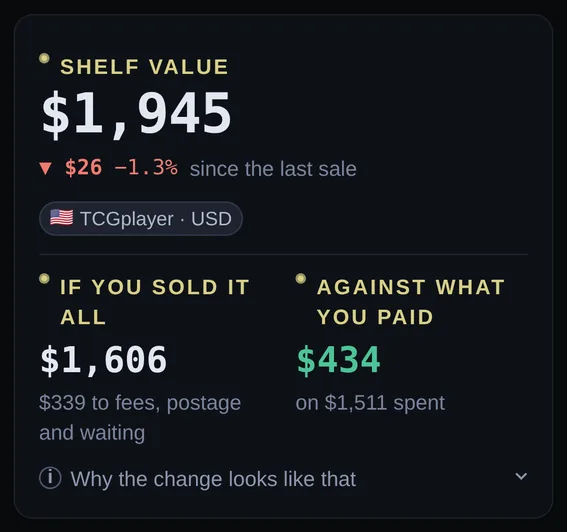
Your shelf, priced daily
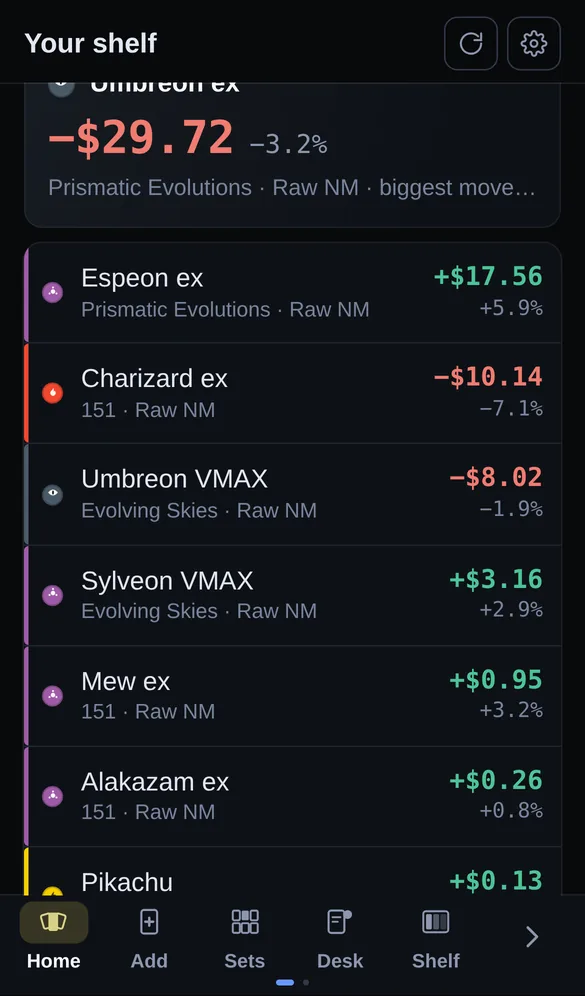
Add cards as you pull or buy them. The total follows the market, what you paid sits beside what the cards are worth now, and the change is measured against each card's previous recorded sale rather than against midnight, because most cards do not sell every day and a daily percentage would mostly be noise.
Cards with no price in your market are left out of the total and counted separately, rather than quietly treated as worth nothing.
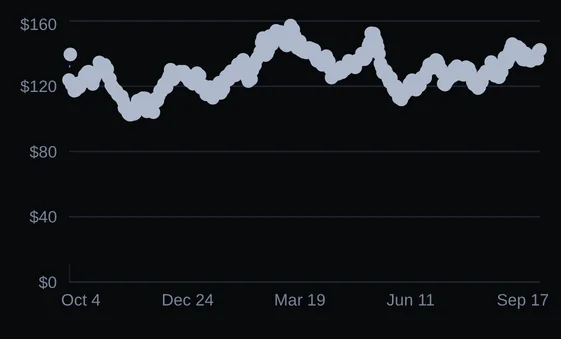
A year of prices behind every card
Open a card and you get its history in one market, drawn honestly: a line where the readings are dense enough to carry one, and unconnected points where they are not. Deskdex never joins the dots across months of silence to make a chart look finished.
Graded prices, the grading fees, and what a grade has historically added for cards like this one are all separate figures, each labelled as a reading or an estimate.
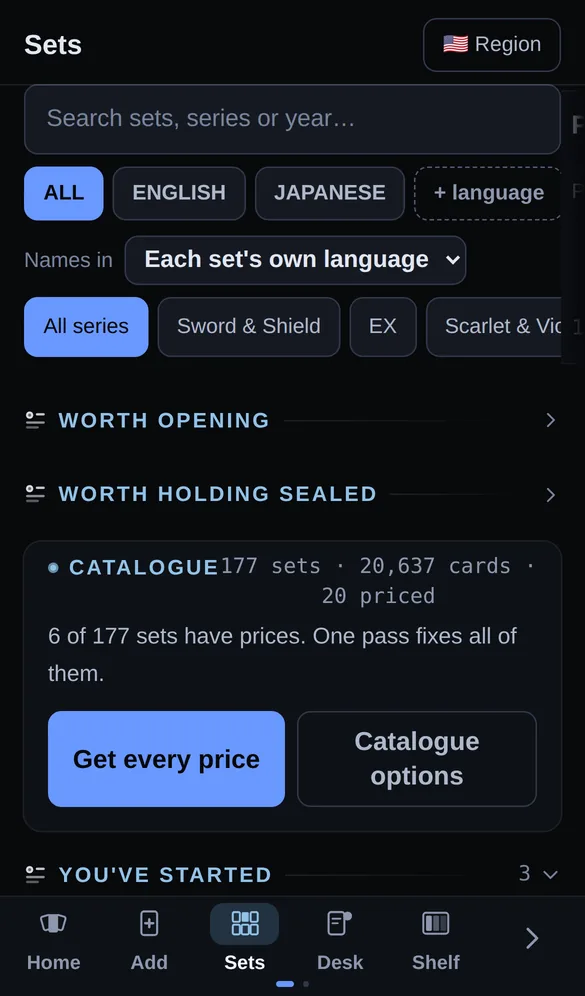
Every set, and what finishing one costs
All the English sets and the Japanese ones, with how much of each you hold and the cost of the cards you are missing at today's prices. Sets that have been announced but not released are listed too, with the date and how much of the list is confirmed rather than rumoured.
Trades priced on both sides
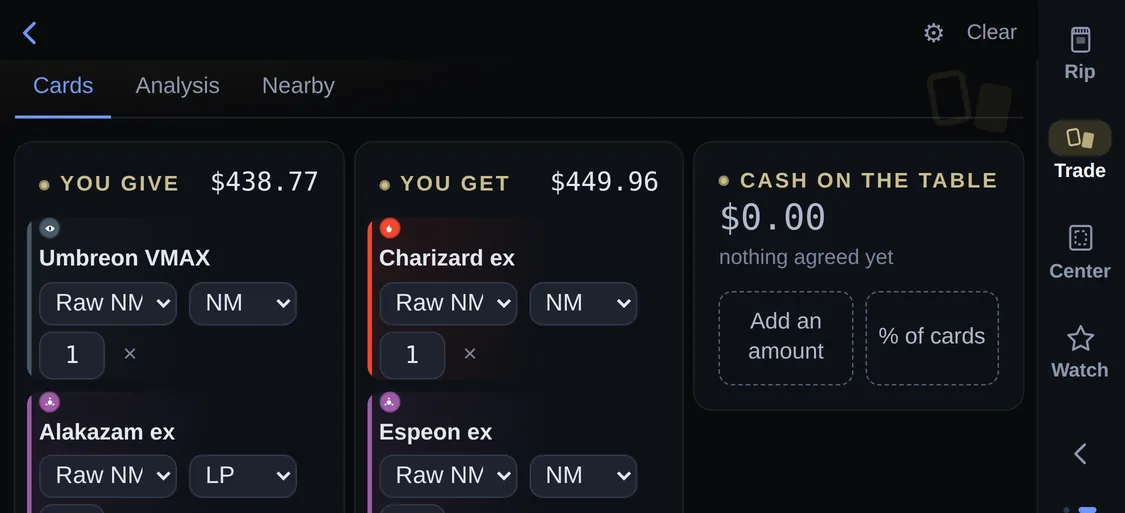
Put the cards you are giving on one side and the cards you are getting on the other. Both piles are priced in the same market on the same day, with condition taken into account, and the app also shows what each side would clear if you sold it instead, because that is the real alternative to a trade.
Turn the phone sideways and the two piles sit beside each other, which is how a trade is laid out on a table.
Something to show people
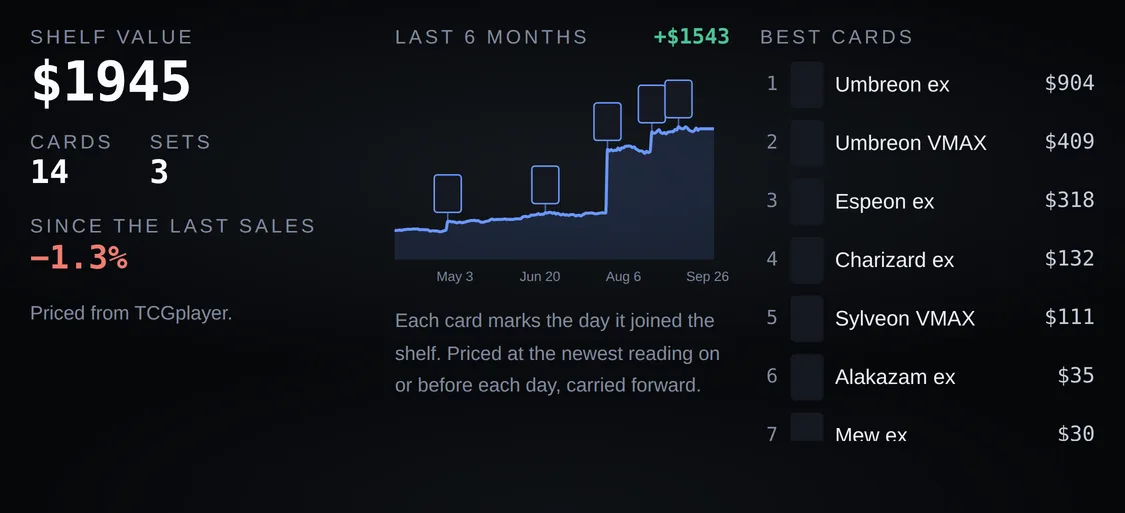
Display mode puts one card on the screen at a time with its grade and its price, and sideways it adds what the whole collection is worth and a line of its value over the last six months with a thumbnail on the day each card arrived. You can lock it with a short code before handing the phone over, and the lock lets go by itself after five minutes.
There is also a centering tool: photograph a card and it measures the border split against the graders' published limits. It measures; it never predicts a grade.
How a price is made
Every figure can be traced back to something published.
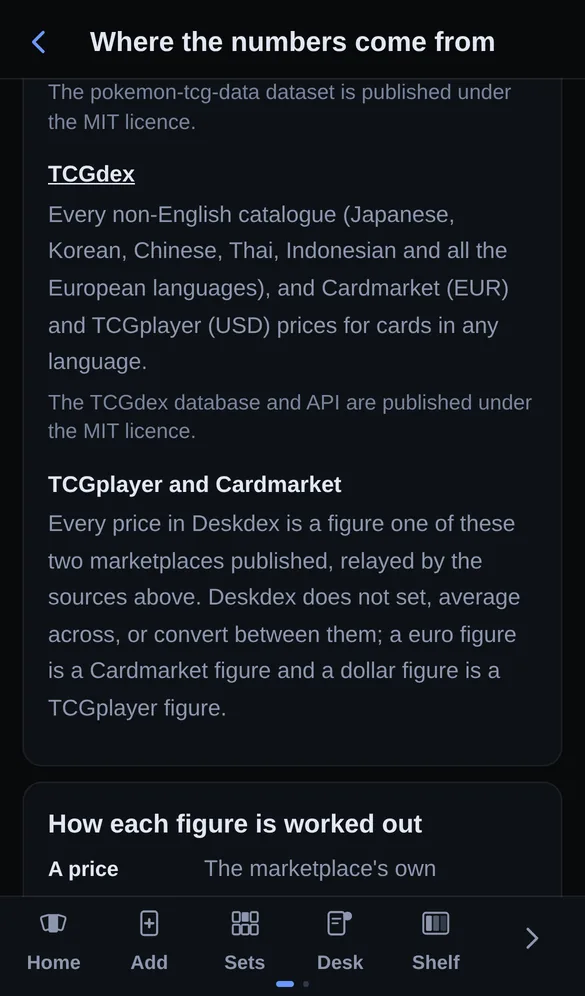
This is the part most collection apps do not write down. Deskdex ships the rule behind each number inside the app as well, on a screen called "Where the numbers come from", so it cannot drift away from what the code actually does.
- A price
- The marketplace's own published figure for that exact printing, relayed with its market, its currency and the day it was read. Nothing is averaged across marketplaces: a euro figure is a Cardmarket figure and a dollar figure is a TCGplayer figure, and the gap between them is shipping, VAT and local demand rather than an exchange rate.
- A valuation
- Built from the observations on file for that printing and grade, in one market. Where there are few, the app says the reading is sparse instead of smoothing it into a confident number.
- Graded value
- A raw card's price plus what the grade has historically added for cards like it, which is an estimate and is labelled as one. Grading costs come from a dated table of the graders' published fees, shipping and insurance included, and the app says when that table is getting old rather than quoting a fee that has changed.
- Centering
- Measured from your photo: the border widths are found on the image and turned into a left/right and top/bottom split, then compared against the grader's own published tolerances. The verdict is geometry only. It cannot see surface scratches, edge wear or print lines, which is why it never predicts a grade.
- Pull rates
- Nobody publishes official ones, so every figure anywhere is somebody's count of opened packs. The app ships published counts with the sample size each one disclosed, blends in packs logged in the app once there are enough of them, and marks a rate whose source disclosed no sample rather than computing against it quietly.
- Freshness
- The server refreshes prices overnight on a schedule it learns from the source's own publishing time, cards people actually hold first, and opening a card fetches that card's price if nobody has today. The app prints the date of the newest reading on the home screen rather than implying everything is current.
What it will not do
The refusals are the product too.
- It does not invent prices. No model guesses what a card "should" be worth. If there is no reading in your market, the app says so and leaves the card out of the total.
- It does not predict grades. The centering tool measures borders. Surface, edges and print lines decide grades too, and a photograph cannot see them.
- It does not track you. No analytics scripts, no cookies, no ad networks. Without an account your collection never leaves your browser.
- It does not re-host card artwork. Pictures load from the sources' own image hosts. Card names and artwork belong to their publisher.
- It is not investment advice. Forecasts are projections from the history on file, shown with their range, and they can be wrong.
Questions
The things people ask before they install anything.
- Is it free?
- Yes, and there is nothing to buy: no paid tier, no trial that ends, no ads and nothing sold on. If that ever had to change so the server could pay for itself, this page would say so before the app did.
- Do I need an account?
- No. Without one your collection is kept in your own browser and never reaches the server, which also means it is on that one device. An account exists for people who want the same shelf on a phone and a laptop, and whatever you added before signing up carries across.
- Does it work without a signal?
- Once it is on your home screen, yes: your shelf and the last prices it fetched are there, and the app says how old each figure is. Fetching new prices needs a connection, and it will tell you it could not rather than showing you yesterday's number as though it were today's.
- Where do the prices come from?
- The marketplaces' own published figures, relayed with the name of the marketplace, the currency and the day they were read. TCGplayer in dollars, Cardmarket in euros, never averaged together. The rules are written out above, and they ship inside the app as well.
- Is this official?
- No. It is a fan-made tool with no connection to Nintendo, Creatures, GAME FREAK or The Pokémon Company, and it does not re-host card artwork: pictures load from the sources' own image hosts.
- Why is it not in the App Store?
- Because it does not need to be. It is a web app, so it installs from the browser in three taps and updates itself with no store review in the way. What you get on your home screen behaves like any other app: its own icon, full screen, no browser bars.
- What happens to my collection if this project stops?
- Without an account there is nothing to lose access to, because the collection is already on your device. With an account, the settings screen hands you everything the server holds about you as a file, and deleting the account deletes it rather than deactivating it.
- Japanese cards?
- In the catalogue alongside the English ones, with their own sets and their own prices. A Japanese printing is a different card from its English counterpart and is priced as one.
Install
It goes on the home screen. There is nothing to download.
Deskdex is a web app, so "installing" it means adding the page to your home screen. It then opens full screen with no browser bars, keeps your shelf and the last prices it fetched when you have no signal, and updates itself.
iPhone and iPad
- Open the app in Safari or Chrome.
- Tap the Share button, the square with an arrow coming out of it.
- Scroll down and tap "Add to Home Screen", then "Add".
Android
- Open the app in Chrome.
- Tap the three dots in the top right.
- Tap "Add to Home screen" or "Install app".
Computer
- Open the app in any browser. It works in a tab as it is.
- In Chrome or Edge, the install icon in the address bar puts it in its own window.
- On a Mac, Safari's File menu has "Add to Dock".
Who makes this
One collector, no company behind it.
Deskdex is written and paid for by one person who collects Pokémon cards and got tired of guessing what a shelf was worth. There is no company, no investor and nothing being tested on you: the reason it has no analytics is that nobody here wants the data, and the reason it has no ads is that an app which tells you what your cards are worth should not also be paid by somebody who wants you to buy more.
The server counts one thing, which is how many sessions happened on each day, with no identifier attached to any of them. The privacy page says exactly what that row contains and what it cannot contain.
Found something wrong, or something missing? There is a feedback box in the app under More, and it reaches the person who wrote the code rather than a queue.
Open it and add one card.
That is the whole trial. No account, no email, nothing to cancel: the first card you add prices itself and the total is on the screen a second later.